Build coverage sooner.
Move a well-defined business workflow from discussion to an executable test flow in the same delivery cycle—not after months of framework work.
Forge is the system for test automation
Forge helps QA teams deliver reliable automation faster by turning business workflows into reusable test assets. Reduce dependence on scarce framework specialists, repair application changes once instead of across dozens of scripts, and give release leaders clear evidence of what is ready to ship.
No vendor lock-in. Your automation remains yours.
Built for QA managers
Forge turns application knowledge into reusable automation assets so your team can deliver coverage sooner, maintain it with less effort, and make better release decisions.
Move a well-defined business workflow from discussion to an executable test flow in the same delivery cycle—not after months of framework work.
Update shared screen behavior once, then reuse that correction across the tests that depend on it.
Let more of the QA and product team contribute without requiring everyone to become a Java, Cypress, Playwright, or C# expert.
Keep the screen, data, business scenario, test flow, and execution result connected in one place.
Show which customer journeys are protected, what passed, what failed, and what needs attention before a release.
Built without vendor lock-in
Forge helps your team create and organize automation, but it does not trap that work inside a SaaS platform. Publish the generated code to your own Git repository and run it in your own environment. If you ever stop using Forge, the automation your team created remains yours to keep, maintain, and run.
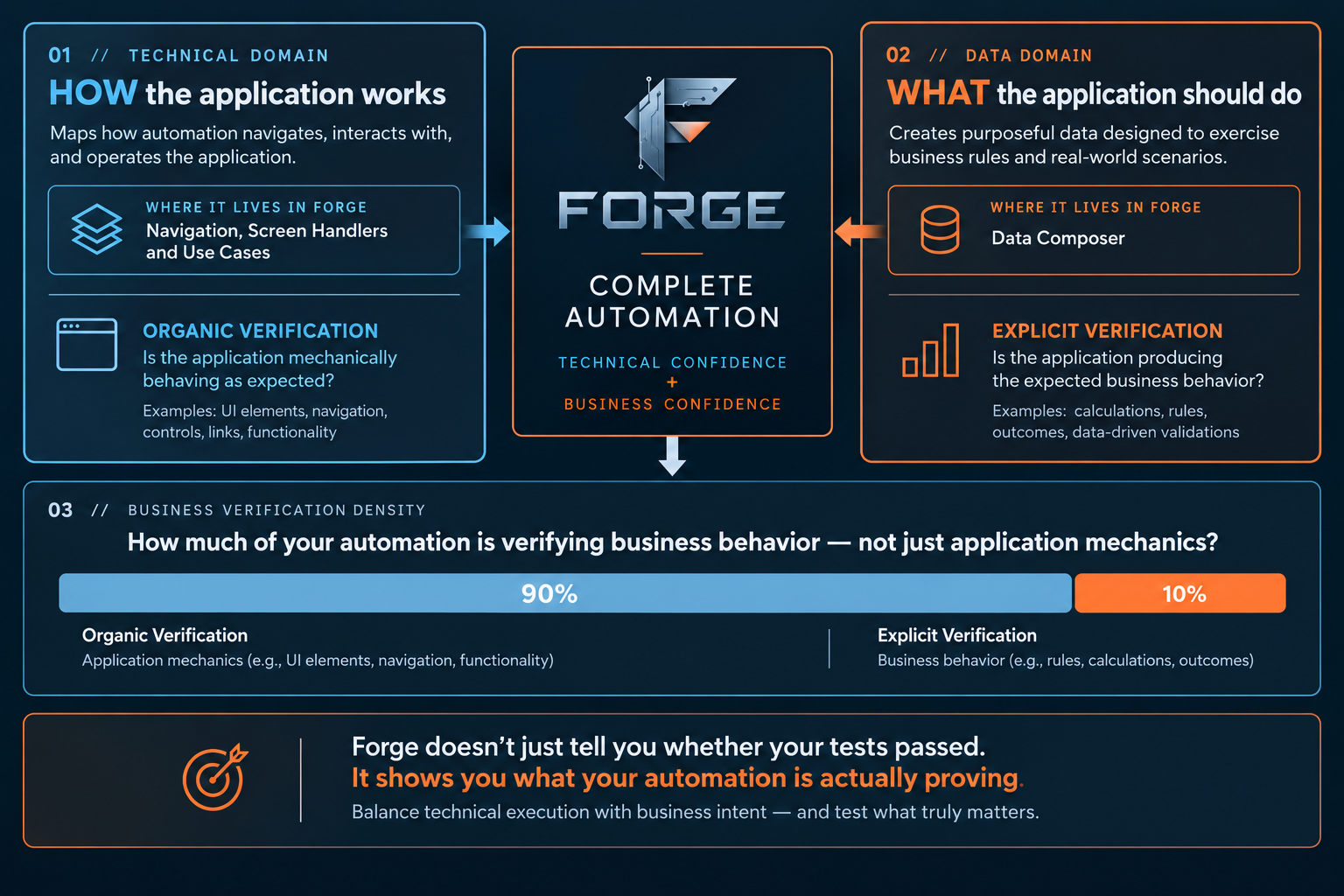
Two domains. One outcome.
Forge connects the technical model of the application with the meaningful business data that exercises its rules—so your team can test the decisions that matter, not simply the clicks.
The challenge
Most QA teams already have testing tools. The problem is that creating, maintaining, and understanding automation still takes too much time—and too much knowledge is held by too few people.
When each test contains its own knowledge of screens, buttons, and navigation, a small UI change forces the team to find and repair the same issue in many places.
If automation depends on Java, Cypress, Playwright, C#, or another specialized stack, progress stops whenever the right specialist is unavailable.
Without a shared pattern, two automation engineers can solve the same problem differently. That creates duplicate work, inconsistent results, and more maintenance later.
A new requirement often passes from product to development, then QA, then an automation specialist who must first understand the screen, rules, data, and existing code. By the time the test is ready, the feature may already be waiting for release.
A test can confirm that a button worked while missing the customer rule, policy, calculation, or decision that the business actually needs to protect.
The Forge answer
Forge captures screens, controls, routes, and behavior as shared assets—not private knowledge trapped in a test script.
Forge gives QA, product, and automation teams a shared way to describe screens, intent, data, and flows without requiring every contributor to author the underlying Java, Cypress, Playwright, C#, or other framework-specific implementation.
Reusable screen handlers, use cases, test data, and flows make the right pattern the easy pattern.
Connected assets remove repeated context gathering and accelerate the journey from a stated requirement to a runnable test.
Use cases express the customer outcome and business rules first, then connect them to implementation and execution evidence.
Forge in the AI-driven delivery lifecycle
AI can help a team move faster. But leaders need more: one clear way to decide what to test, keep the work organized, and show that a release was ready for customers.
Claude and Codex are valuable assistants for thinking through problems and writing code. By themselves, they are not designed to run a company’s automation program.
Forge keeps the work that AI helps accelerate in one place: what the application does, what the business needs, how the test is built, and what happened when it ran.
State the business need—such as what must happen when a customer changes an address.
Forge shows the screens, rules, and data involved in that customer journey.
Use AI to speed up the analysis, drafting, and refinement of the work.
Test the assembled journey from start to finish, including the address change.
Give leaders a clear view of release readiness and the items that need attention.
Forge does not replace capable AI assistants. It gives their work a lasting place in a quality program that leaders can see and manage.
See it in action
Each Forge capability solves a specific failure point in the automation lifecycle—while strengthening the work that comes after it.
The problem Architectural knowledge lives in individual tests, so UI changes turn into fragile repairs across the suite.
How Forge solves it Screen Handlers centralize each screen’s interactions, controls, and verification steps into a reusable, governed asset.
The problem Test steps can prove technical behavior while missing the decisions, rules, and customer scenario the business needs protected.
How Forge solves it Use Cases organize automation around an explicit intent: the scenario, conditions, expected result, and rules that define success.
The problem Test data preparation is often manual, inconsistent, and owned by too few people—slowing everyone who depends on it.
How Forge solves it Data Composer makes scenario-ready test data part of the same workflow, so the team can prepare meaningful inputs without a separate, fragile process.
The problem Individual contributors stitch together screens, data, and test logic differently—making delivery slow and difficult to maintain.
How Forge solves it Test Flow Assembly brings reusable assets together in a visible, deliberate sequence that teams can understand, review, and extend.
The problem When execution happens far from the work that created it, failures are slow to understand and results lack useful context.
How Forge solves it Execution runs the connected assets and brings outcomes back to the workspace where their architecture, data, and intent are already understood.
The Forge difference
In a Forge pilot, measure how much faster your team can automate a workflow, repair a changed screen, prepare test data, diagnose failures, and produce release evidence.
Measure the Forge difference